My oldest daughter's favourite time of the week is when her Beano lands on the doormat.
It's also my youngest daughter's least favourite time of the week, because her playmate disappears into a corner to devour it for the rest of the day.
She's just learning to read, so she isn't quite ready for the Beano herself. She loves having it read to her and hearing what mischief the characters are up to, and she's very keen to read on her own. But the books pitched at her level are, let's be honest, pretty dry and repetitive.
If only the comic was written at her reading level, so she could get in on the fun.
So why couldn't it be?
We have computer vision libraries that can find the speech bubbles and read the text. We have LLMs that can rewrite that text for a five-year-old. We have libraries that can draw it back onto the page.
So I snapped a few phone photos of her favourite strips (Minnie the Minx and Gnasher and Gnipper, if you're interested!), fired up everyone's favourite friend Claude, and got building.
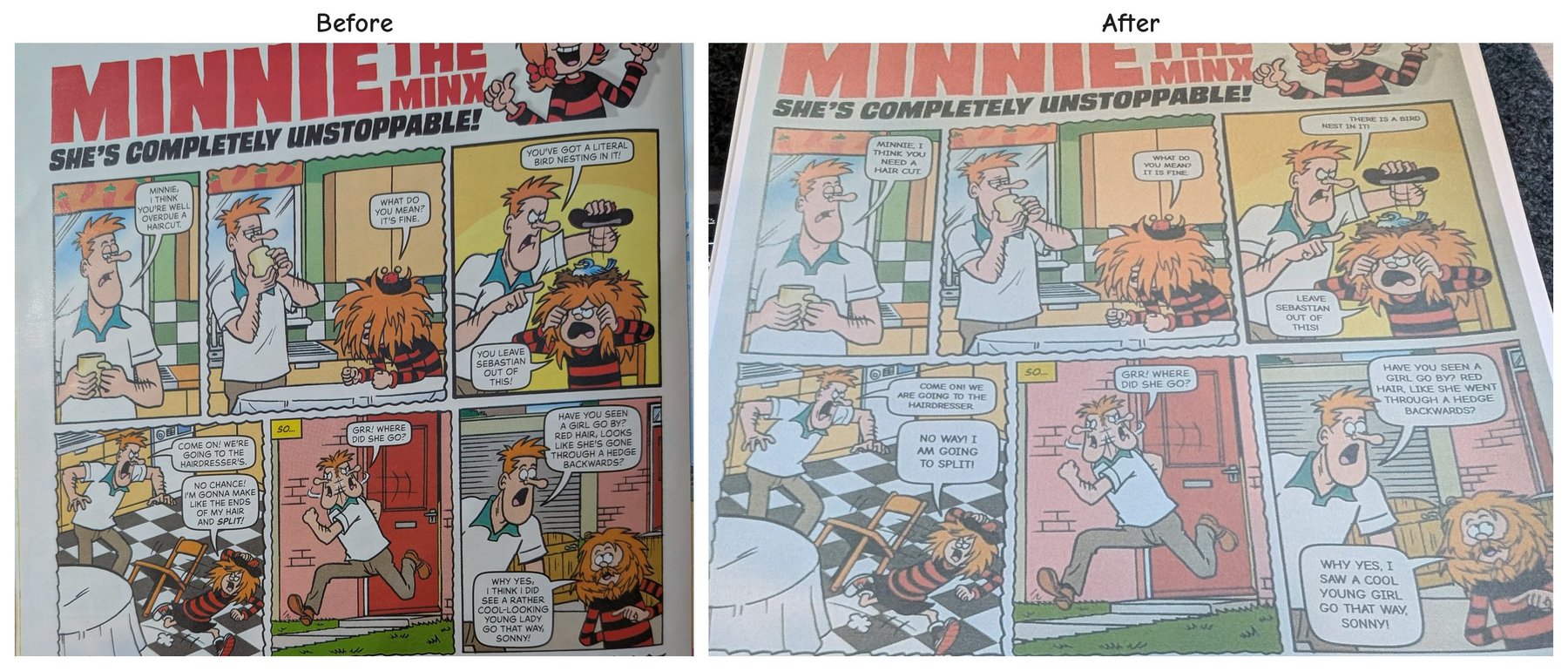
Minnie the Minx © DC Thomson & Co. Ltd. Words: Andy Fanton, art: Laura Howell. Shown here to explain the project. No rewritten comics are shared or sold.
How it works
It's a single Python script that chains a handful of steps together:
- Tidy the photo - OpenCV finds the page among the clutter on the kitchen table, squares it up and turns it the right way round.
- Find the bubbles - a speech bubble is basically a patch of white paper with letters in it. It looks twice, once strictly and once more loosely, so bubbles in glare or shadow aren't missed.
- Read the text - Tesseract OCR reads each bubble, and anything it isn't confident about (or that looks like a sign in the artwork) is left alone.
- Rewrite it - the whole page goes to an LLM in reading order, so it understands the story rather than seeing each bubble on its own.
- Re-letter it - the old lettering is painted out with the bubble's own paper colour and the new text is set in Comic Neue, sized to fit the bubble.
- Print it - everything is stitched into a PDF.
One rule I set early: AI only touches the words. The artwork is never regenerated or "AI-edited". Every other step is plain, predictable code, so the page still looks like the Beano.
Getting the words right
The rewrite step was where most of the fiddling went. "Make it simpler" isn't enough. The prompt is built around how she's actually being taught to read (Primary 1 phonics):
- Decodable words first - simple sounds she can blend (cat, ship, rain), plus the common "tricky words" like the, said and was.
- No contractions - "can't" becomes "cannot".
- Sentence case, not ALL CAPS - the first print (above) kept the comic's capitals, but I've since switched to ordinary sentence case, which is much easier for a beginner reader.
- Keep the story - same bubbles, same speaker, same plot beats, and no longer than the original.
- Keep the jokes where you can - if a pun only works for grown-ups, swap in a simple line at the same moment.
Early versions were too literal: it loved rare-but-technically-decodable words like "bog" for puddle and "vex". Nudging it towards familiar words fixed most of that.
A few real examples:
- "No chance! I'm gonna make like the ends of my hair and split!" → "No way! I am going to split!"
- "Perhaps they need my super-spy assistance." → "They may need my spy help."
- "It's cold outside and I don't want you to catch a chill." → "It is cold out. I do not want you to get cold."
- "I might not catch a chill, but I did catch a robber!" → "I did not catch a cold, but I caught a robber!"
Finally, I added a little review page that shows each bubble before and after, flags anything worth a second look, and lets me tweak a line and re-render in a click. A whole issue takes about three minutes, plus a quick read-through.
The result
The output was generally pretty great. The language was largely right for her level, the story stayed intact, and the jokes still landed.
I printed the pages, stapled them together and posted them through the door for her to find on the next dreaded Beano day.
Next steps
It's a good first version, but there's more to do:
- Get the language even closer to her level. There are still a few words she can't work out on her own, so I'll keep refining the prompt, using the words she gets stuck on as a guide.
- Cope better with my bad photos. Most of my snaps are taken quickly on the kitchen table, at an angle and in uneven light. I'm improving how the page is found, straightened and lined up so that a rough photo still gives a clean page.
If you're interested in the code, let me know and I'm happy to share!