Our house runs on Yoto. Pop a card in, the story plays, job done. But I wanted something for the next stage: the same simplicity, in a player that fits in a pocket and feels a bit more grown up.
I wasn't the only one feeling it. In the run-up to the 4th generation launch this autumn, Yoto's teasers had the parent groups buzzing. A lot of people guessed it would be a player for older kids. The reveal brought a new Yoto Player and Yoto Mini, and a Green Button that plays favourites without a card - lovely upgrades, but not quite the next step I'd been hoping for.
So I went shopping for that "next thing" myself, and came back empty-handed. A phone or tablet comes with the whole internet attached, and even completely locked down is still a "phone". The basic MP3 players I looked at seemed like a maze of menus, and nowhere near as visual as the Yoto experience. I couldn't find the middle ground I wanted.
What a first gadget should be
Rather than keep looking, I wrote down what I actually wanted to hand over. It came out as a short list:
- It does one thing. Stories, music and podcasts. No browser, no store, no games.
- It never goes online. No Wi-Fi, no account, nothing reporting back what they listen to.
- There's nothing to wander into. No settings or apps for little fingers to break, no dead ends.
- It's easy to fill. I already make Yoto playlists - I shouldn't have to start again.
- It feels like theirs. Something they're proud to carry, not a hand-me-down phone with the apps hidden.
Nothing ticked all five. So I started building it.
Studio Pocket
Studio Pocket turns the Innioasis Y2 - a small music player with a click wheel that looks a lot like an old iPod - into exactly that.
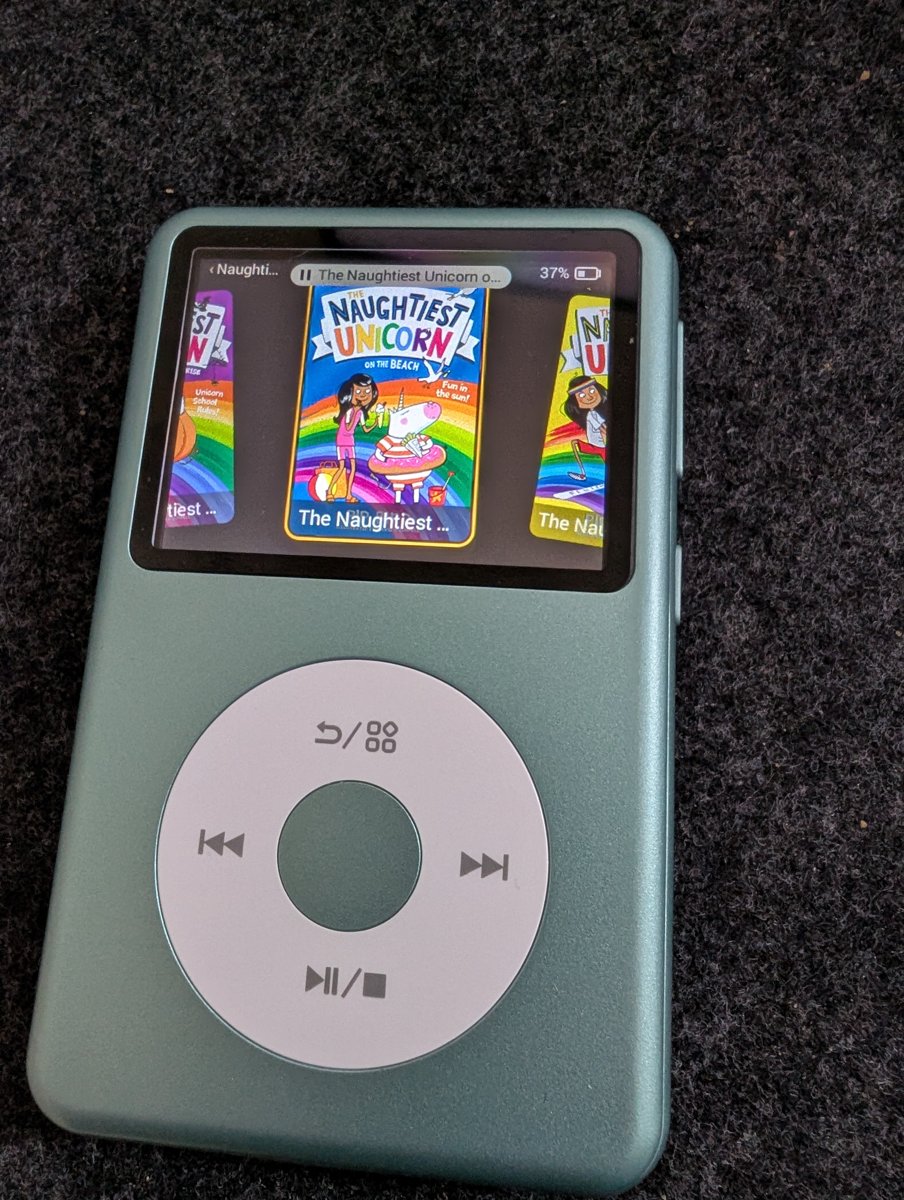
I wanted to keep the essence of the Yoto experience: playlists as big covers, pixel-art track icons and a simple, kid-friendly interface. You turn the wheel to browse, press the middle to play, and it remembers where you were in every audiobook. That's it. The grown-up bits - Bluetooth headphones, a volume limit, a sleep timer - are tucked away behind a long press.
My first beta user - my oldest daughter - picked it up and immediately figured out how to navigate it. That felt like a big win: the interface made sense to the person I'd built it for.
Filling it is done from a computer. It plays audio you already have, and if you use MYO Studio you can send your Yoto Make Your Own playlists straight across. Once it's loaded, they can listen without a phone or computer.
The hard part
The Y2 is a fairly low-powered device running an old version of Android, so keeping the interface snappy was tricky. A simple interface still needs to feel responsive when you turn the wheel, and getting that right within the device's limits was one of the harder parts of building it.
Studio Pocket also replaces the player's software entirely. That's not something to take lightly with a device likely to be set up by non-techy, busy parents, so setup is cautious by design: it backs up the original software before making changes, so you can restore it later, and stops if it finds something it doesn't recognise.
Try it
Studio Pocket is in beta, and the beta is free to join. You'll need to buy your own Innioasis Y2 separately. There are two ways to set it up, both giving you the same Studio Pocket experience on the device:
- Do it yourself - free and open source, if you're happy typing commands into a terminal. It's all on GitHub.
- Studio Pocket Desktop - an app that walks you through setup, then lets you pick playlists and press Send to player. It'll be a paid app when it's ready.
So far it's been tested from a Mac, so if you're on Windows I'd especially love your help.
You can find out more at pocket.myostudio.app. If you've got a Y2 (or fancy getting one), join us on Discord for all the beta details - I'd love to hear how you get on.